

Alignment Plugin
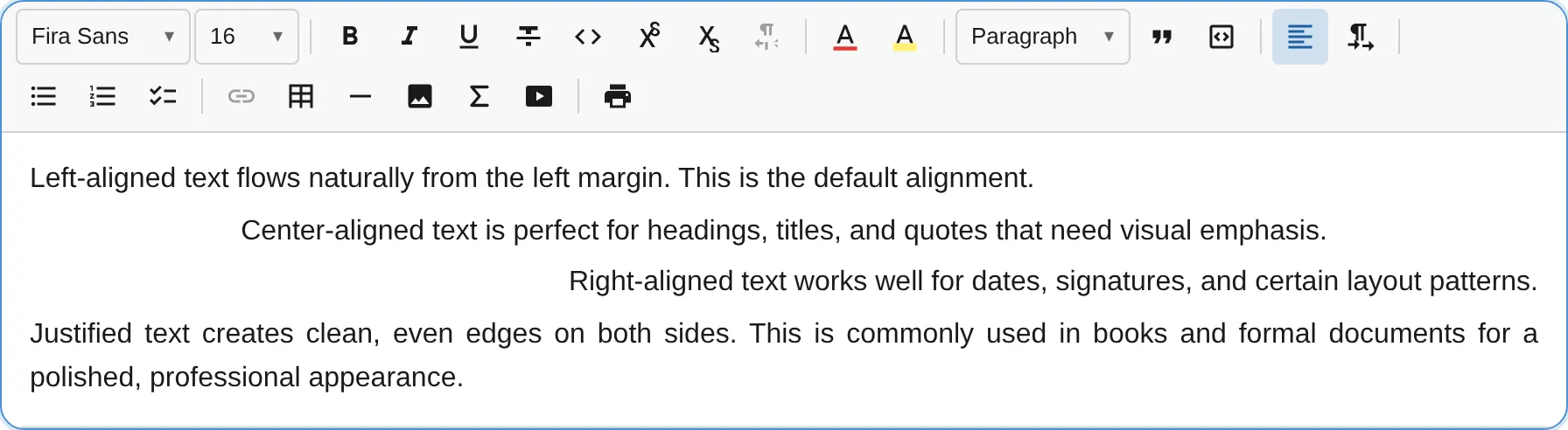
The AlignmentPlugin adds text alignment support for paragraphs, headings, and other alignable block types. It uses logical alignment values (start/end) instead of physical values (left/right) for correct behavior in both LTR and RTL text directions.
import { AlignmentPlugin } from '@notectl/core/plugins/alignment';
new AlignmentPlugin()// or restrict alignments:new AlignmentPlugin({ alignments: ['start', 'center', 'end'] })
Configuration
Section titled “Configuration”interface AlignmentConfig { /** Enabled alignment options. Default: ['start', 'center', 'end', 'justify'] */ readonly alignments: readonly BlockAlignment[]; /** Block types that support alignment. Default: ['paragraph', 'heading', 'title', 'subtitle', 'table_cell', 'image'] */ readonly alignableTypes: readonly string[]; /** Per-type default alignment. E.g. { image: 'center' } */ readonly defaults: Readonly<Record<string, BlockAlignment>>; /** Your own CSS class per alignment in HTML content. See "Custom CSS Classes". */ readonly styleClasses?: StyleClassNames<BlockAlignment>; /** Custom locale strings. */ readonly locale?: AlignmentLocale;}
type BlockAlignment = 'start' | 'center' | 'end' | 'justify';type StyleClassNames<K> = Readonly<Partial<Record<K, string>>>;Logical Values and RTL Support
Section titled “Logical Values and RTL Support”The plugin uses CSS logical values instead of physical directions:
| Logical Value | In LTR | In RTL |
|---|---|---|
start |
Left-aligned | Right-aligned |
end |
Right-aligned | Left-aligned |
center |
Centered | Centered |
justify |
Justified | Justified |
This ensures alignment works correctly regardless of text direction. When combined with the TextDirectionPlugin, alignment automatically adapts to the block’s direction.
Example: No justify
Section titled “Example: No justify”new AlignmentPlugin({ alignments: ['start', 'center', 'end'],})Example: Custom alignable types
Section titled “Example: Custom alignable types”new AlignmentPlugin({ alignableTypes: ['paragraph', 'heading', 'blockquote'],})Custom CSS Classes
Section titled “Custom CSS Classes”Available from notectl 2.4.0.
By default, class-based HTML export
writes alignment as notectl-align-center and similar classes. If your application already has
classes for alignment, for example from a CMS, a design system or a previous editor, configure
them once with styleClasses. Colors, highlights, font sizes and fonts have the same option; see
Custom CSS Classes for the whole picture.
import { AlignmentPlugin } from '@notectl/core/plugins/alignment';
new AlignmentPlugin({  styleClasses: {    center: 'align-center',    end: 'align-end',    justify: 'align-justify',  },});
// With the full preset:createFullPreset({ alignment: { styleClasses: { center: 'align-center' } } });
Every HTML boundary of the editor then uses your classes:
const { html, css, styleMap } = await editor.getContentHTML({  cssMode: 'classes', includeBlockIds: false,});// html:     <p class="align-center">Centered text</p>// css:      .align-center { text-align: center; }// styleMap: Map { 'align-center' => 'text-align: center' }
await editor.setContentHTML(html); // no styleMap needed: the alignment is restored- Export (
getContentHTML({ cssMode: 'classes' })) writes your class instead ofnotectl-align-*. The returnedcssandstyleMapcontain the same class names ashtml, so the result renders on its own and re-imports anywhere through thestyleMap. - Import and paste recognize your classes directly, including paragraphs, headings, images and table cells. A pasted paragraph’s explicit alignment applies to the destination when it supports alignment, preserving its block type and unrelated attributes such as text direction. Unformatted inline paste keeps the destination’s formatting. Content with notectl’s default classes still imports and is written with your classes on the next export, which makes switching an existing store over a matter of re-saving.
- The document stays semantic. The editor stores
align: 'center', never a class name.styleClassesis initialization configuration. Recreating the editor with another mapping changes the exported names without changing the semantic alignment stored in your JSON document. - Alignments without a class keep notectl’s default names, so you can map only the ones your stylesheet knows.
- Inline export is unchanged. The default
getContentHTML()keeps writingstyle="text-align: …", so self-contained HTML (for example for emails) works as before.
Start Alignment
Section titled “Start Alignment”start is the default alignment for text blocks and normally needs no alignment markup. An
explicit start still exports when it overrides an aligned container or a different block default,
such as a centered image. Map start when your stylesheet needs a named class, for example because
your content area is justified by default:
new AlignmentPlugin({ styleClasses: { start: 'align-start', center: 'align-center', end: 'align-end' },});With a start class, start-aligned blocks outside an aligned container get that class, whether
they were aligned to start explicitly or never aligned at all. Setting a centered block back to
start replaces align-center with align-start.
Inside an aligned container, such as a centered table cell, blocks without their own alignment
inherit the container’s alignment in both the editor and the exported HTML. An explicit start,
whether imported or set with alignStart, overrides the container and keeps its class on export.
Without a configured start class, export writes notectl-align-start in class mode or an inline
text-align: start in inline mode so that the override also survives re-import.
<td class="… align-center"> <p>Centered by the cell</p> <p class="align-start">Explicitly start-aligned</p></td>Right-to-Left Content
Section titled “Right-to-Left Content”Alignment in notectl is logical: start and end follow the text direction. Write the CSS for
your classes with logical values, as notectl’s generated CSS does:
.align-start { text-align: start; } /* left in LTR, right in RTL */.align-center { text-align: center; }.align-end { text-align: end; } /* right in LTR, left in RTL */.align-justify { text-align: justify; }A class with physical CSS such as .align-left { text-align: left; } matches start only in
left-to-right text. If you map start to it, start-aligned right-to-left blocks render on the wrong
side. For the same reason the keys are always logical: { left: 'align-left' } is rejected with a
hint to use start.
Images, Videos and Table Cells
Section titled “Images, Videos and Table Cells”The class goes on the element that carries the alignment in exported HTML:
| Block | Element with the class |
|---|---|
| Paragraph, heading, title, subtitle | The block element itself (<p>, <h2>, …) |
| Image | The <figure> wrapper around the <img> |
| Video | The <figure> of the exported video |
| Table cell | The <td>; import also reads <th> |
Images and videos are centered by default. One aligned to the start is therefore exported with the
start class, or with notectl-align-start when start has no class, so that importing the HTML
restores it. Videos are aligned with the VideoPlugin’s own controls and use the same classes.
Rendering in the Editor
Section titled “Rendering in the Editor”The classes describe your exported content. They do not change how the editor renders: inside its
Shadow DOM the editor applies alignment itself, CSP-safe and without your stylesheet. Load your
stylesheet, or the returned css, where you display the exported HTML. See
Using Your Own Class Names
for a complete example.
Rules for Class Names
Section titled “Rules for Class Names”The editor checks styleClasses when it initializes. An invalid configuration makes
createEditor() (or init()) reject with a TypeError that names the problem and the fix:
- Keys are
start,center,endandjustify. - Each value is one CSS class name of letters, digits,
-and_that does not start with a digit. Selectors that need escaping (md:text-center) and lists of classes ('a b') are not supported. - The prefix
notectl-is reserved for the classes notectl generates. - Each alignment needs its own class; otherwise import could not tell them apart.
The Custom CSS Classes guide describes how import resolves conflicting classes and inline styles.
Commands
Section titled “Commands”| Command | Description | Returns |
|---|---|---|
alignStart |
Align text to start (left in LTR, right in RTL) | boolean |
alignCenter |
Center text | boolean |
alignEnd |
Align text to end (right in LTR, left in RTL) | boolean |
alignJustify |
Justify text | boolean |
editor.executeCommand('alignCenter');editor.executeCommand('alignStart');Keyboard Shortcuts
Section titled “Keyboard Shortcuts”| Shortcut | Action |
|---|---|
Ctrl+Shift+L / Cmd+Shift+L |
Align start |
Ctrl+Shift+E / Cmd+Shift+E |
Align center |
Ctrl+Shift+R / Cmd+Shift+R |
Align end |
Ctrl+Shift+J / Cmd+Shift+J |
Justify |
Toolbar
Section titled “Toolbar”The alignment plugin renders as a dropdown button with alignment icons. The currently active alignment is highlighted. Only alignments listed in the alignments config appear in the dropdown.
Middleware
Section titled “Middleware”The plugin registers transaction middleware that preserves the align attribute when a block’s type changes (e.g., paragraph to heading). This ensures alignment survives block type transformations.
Node Attribute
Section titled “Node Attribute”The plugin patches existing node specs to add an align attribute:
| Attribute | Type | Default | Exported As |
|---|---|---|---|
align |
string |
'start' |
style="text-align: center", or in class mode class="notectl-align-center" / your class |
When alignment is 'start', the export normally omits alignment markup. It still writes an alignment
when the block’s own default differs (images are centered), an explicit start overrides an aligned
container, or start has a custom class outside an aligned container. Blocks
without their own alignment continue to inherit aligned containers.