

Text Color Plugin
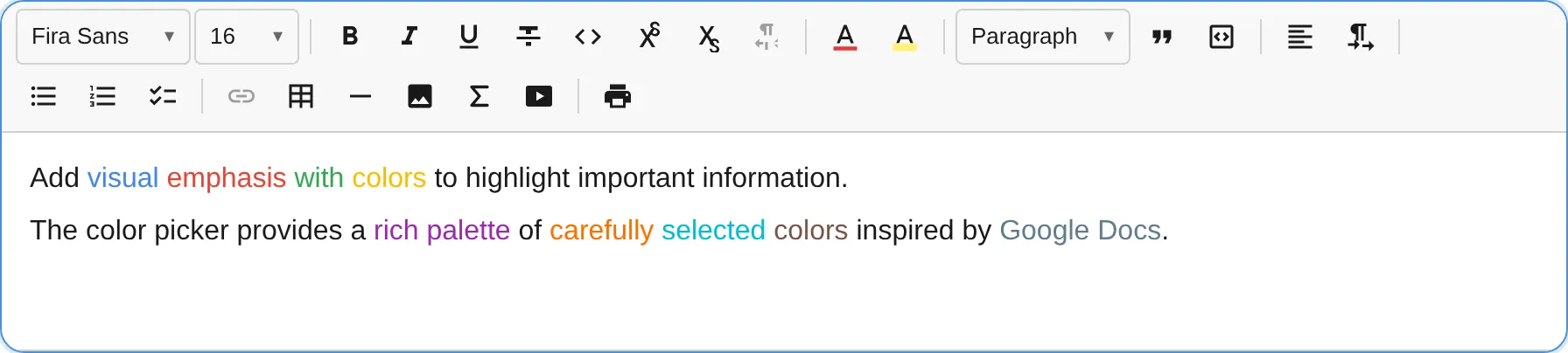
The TextColorPlugin provides a color picker popup for changing text color, with a customizable palette defaulting to Google Docs’ 70-color grid.
import { TextColorPlugin } from '@notectl/core/plugins/text-color';
new TextColorPlugin()// or with custom colors:new TextColorPlugin({  colors: ['#000000', '#FF0000', '#00FF00', '#0000FF', '#FFFF00'],})
Configuration
Section titled “Configuration”interface TextColorConfig { /** Custom color palette (hex values). Default: Google Docs 70-color palette */ readonly colors?: string[]; /** Your own CSS class per color in class-based HTML. See "Custom CSS Classes". */ readonly styleClasses?: Readonly<Record<string, string>>; /** Custom locale strings. */ readonly locale?: TextColorLocale;}Colors must be valid hex values (#RGB or #RRGGBB). Invalid values cause an error to be thrown. Duplicates (case-insensitive) are removed.
Custom CSS Classes
Section titled “Custom CSS Classes”Available from notectl 2.4.0.
Class-based HTML export
writes text colors as generated notectl-s-* classes. Map the colors your stylesheet knows to its
classes with styleClasses, keyed by hex color:
const BRAND_COLORS = { '#e03131': 'text-red', '#1971c2': 'text-blue' };
new TextColorPlugin({ colors: Object.keys(BRAND_COLORS), styleClasses: BRAND_COLORS });
const { html } = await editor.getContentHTML({ cssMode: 'classes', includeBlockIds: false });// <p><span class="text-red">Important</span></p>await editor.setContentHTML(html); // the color is restored without a styleMapKeys are hex colors (#RGB or #RRGGBB, any case) and may include colors outside colors, for
example ones your stored content still uses. Import and paste read the classes back, and the
editor stores the color itself, never the class name. Inline export (getContentHTML()) keeps
writing style="color: …". See Custom CSS Classes for the rules shared by all formatting plugins.
Commands
Section titled “Commands”| Command | Description | Returns |
|---|---|---|
removeTextColor |
Remove text color mark (reset to default) | boolean |
editor.executeCommand('removeTextColor');Color application is handled through the toolbar popup’s click handlers — each color swatch applies the corresponding textColor mark.
Toolbar
Section titled “Toolbar”The text color button shows a color swatch preview reflecting the current text color. Clicking opens a grid picker with all available colors. The currently active color is highlighted with a visual indicator and marked as selected for screen readers.
This includes colors from imported or pasted HTML. Browsers read #e03131 back as rgb(224, 49, 49), so notectl stores an imported color that matches a palette color or a styleClasses key in your spelling, and the picker selects it.
Mark Spec
Section titled “Mark Spec”| Mark | Attributes | Renders As |
|---|---|---|
textColor |
color: string |
<span style="color: #FF0000"> |
Default Palette
Section titled “Default Palette”When no custom colors are provided, the plugin uses a 70-color palette matching Google Docs, organized in a 10x7 grid from light to dark shades. The palette includes:
- Row 1: Grayscale ramp (black to white)
- Row 2: Vivid pure colors (red, orange, yellow, green, cyan, blue, purple, magenta)
- Rows 3-5: Light to medium pastels
- Rows 6-7: Darker shades
Custom Palette Example
Section titled “Custom Palette Example”// Brand colors onlynew TextColorPlugin({ colors: [ '#1A1A1A', // Near black '#2563EB', // Brand blue '#16A34A', // Brand green '#DC2626', // Brand red '#9333EA', // Brand purple '#EA580C', // Brand orange ],})