

Markdown Support
notectl includes a built-in CommonMark + GFM Markdown engine as a core capability alongside HTML and JSON interop. The engine is zero-dependency, hand-written, and loaded only on demand via dynamic import(), so builds that never touch Markdown pay nothing for it.
Principles
Section titled “Principles”Postel’s law, applied strictly. The serializer emits well-formed, round-trippable Markdown. The parser accepts the full range of real-world Markdown including reference links, soft-break folding, and raw HTML blocks. Strict output, liberal input.
No silent data loss (by default).
Features with no portable Markdown form (underline, highlight, color, font, video, sized images, etc.) serialize as valid raw HTML inside the Markdown string (htmlFallback: true, the default). A renderer that honours raw HTML (GitHub, any CommonMark-compliant renderer) displays them faithfully. Pass htmlFallback: false to get guaranteed-portable output at the cost of dropping styling-only formatting.
Genuine code-splitting.
The serializer and parser are referenced only via dynamic import() from the async web-component methods. A bundle that never calls getContentMarkdown or setContentMarkdown never receives the engine. A size-limit guard on the package enforces this invariant.
Web Component methods
Section titled “Web Component methods”Both methods are asynchronous: they lazy-import the engine the first time they are called.
// Export: returns a Markdown stringconst markdown: string = await editor.getContentMarkdown();
// Export with optionsconst portable: string = await editor.getContentMarkdown({ htmlFallback: false });
// Import: replaces document content from Markdownawait editor.setContentMarkdown('# Hello\n\nSome **bold** text.');
// Import with optionsawait editor.setContentMarkdown(markdown, { extendedInlineSyntax: true });
Standalone subpath
Section titled “Standalone subpath”For use outside the web component (server-side rendering, build tools, data pipelines):
import {  serializeDocumentToMarkdown,  parseMarkdownToDocument,} from '@notectl/core/markdown';
// Synchronous — no dynamic import overheadconst md: string = serializeDocumentToMarkdown(doc);const doc2 = parseMarkdownToDocument('# Hello');
Both functions accept an optional SchemaRegistry (for plugin-owned node types) and an options object. They are pure, synchronous functions with no side effects.
Serialize options
Section titled “Serialize options”| Option | Type | Default | Description |
|---|---|---|---|
flavor |
'commonmark' | 'gfm' |
'gfm' |
Dialect to emit. gfm adds tables, task lists, strikethrough, and autolinks. |
htmlFallback |
boolean |
true |
Emit raw HTML for features with no Markdown form (underline, highlight, color, block HTML IDs, etc.) to keep the round-trip lossless. |
headingStyle |
'atx' | 'setext' |
'atx' |
ATX (# Heading) or setext (Heading\n===) heading style. Setext applies only to levels 1 and 2. |
bullet |
'-' | '*' | '+' |
'-' |
Bullet marker for unordered list items. |
emphasis |
'*' | '_' |
'*' |
Delimiter for italic and bold. |
codeFence |
'\``’ | ‘~~~’` |
'\``’` |
Fence character for code blocks. The fence is automatically widened if the code contains the fence character. |
listIndent |
number |
2 |
Spaces per indent level for nested lists. |
Parse options
Section titled “Parse options”| Option | Type | Default | Description |
|---|---|---|---|
flavor |
'commonmark' | 'gfm' |
'gfm' |
Dialect to accept. gfm enables GFM tables and task lists. |
htmlFallback |
boolean |
true |
Parse raw HTML blocks and spans embedded in the Markdown back through the HTML parser, recovering superset features on import. |
extendedInlineSyntax |
boolean |
false |
Accept Obsidian/Pandoc-style extensions: ==highlight==, ^sup^, ~sub~. These are import-only (single ~ conflicts with ~~ strikethrough and is not portable on output). |
syntaxExtensions |
MarkdownSyntaxExtension[] |
[] |
Plugin-contributed grammar extensions. When using the web component, extensions registered via registerMarkdownSyntax (e.g. the formula plugin’s $...$) are merged in automatically. |
Editor configuration
Section titled “Editor configuration”notectl’s implicit Markdown behaviour is controlled by a single markdown option passed to createEditor or editor.init. It governs two things:
- Shorthand typing (input rules):
#becomes a heading,**bold**becomes bold,-starts a list,>a quote, and so on. - Paste auto-detection: pasted plain text with strong Markdown signals is converted to rich content.
Some users want their input to stay literal, so that typing # Hello or **bold** keeps the characters verbatim instead of transforming. Pass markdown: false:
import { createEditor } from '@notectl/core';
// Literal mode: typed and pasted Markdown stays as plain textconst editor = await createEditor({  markdown: false,  placeholder: 'Start typing...',});
markdown: true is the default and requires no configuration.
For finer control, pass an object. Each axis resolves independently: an unspecified key keeps its default (shorthand on, paste auto).
// Keep literal typing, but still auto-detect pasted Markdownawait createEditor({ markdown: { shorthand: false } });
// Allow shorthand typing, but never reinterpret pasted textawait createEditor({ markdown: { paste: 'never' } });
markdown value |
Shorthand typing | Paste detection |
|---|---|---|
true / unset |
on | auto |
false |
off | never |
{ shorthand: false } |
off | auto |
{ paste: 'never' } |
on | never |
{ shorthand: false, paste: 'never' } |
off | never |
This option only affects automatic interpretation. The explicit getContentMarkdown() / setContentMarkdown() API, the toolbar buttons, and keyboard shortcuts such as Mod-B stay available regardless. In other words, markdown: false removes the typed shorthand, not the bold or heading capability itself.
Per-feature control
Section titled “Per-feature control”When markdown shorthand is enabled, you can still disable individual shorthands at the plugin level via each plugin’s inputRule option. This is useful to keep most shorthands while turning off one or two:
import { HeadingPlugin, ListPlugin, BlockquotePlugin } from '@notectl/core';
// Headings via `# ` stay on; list and quote shorthands are offnew ListPlugin({ inputRule: false });new BlockquotePlugin({ inputRule: false });
inputRule is supported on every shorthand-registering plugin: TextFormattingPlugin, StrikethroughPlugin, InlineCodePlugin, LinkPlugin, HeadingPlugin, ListPlugin, BlockquotePlugin, HorizontalRulePlugin, CodeBlockPlugin, and FormulaPlugin. The global markdown: false switch is the outer gate: when it is off, no shorthand fires regardless of per-plugin settings.
Paste detection details
Section titled “Paste detection details”paste value |
Behaviour |
|---|---|
'auto' (default) |
Detects strong block-level Markdown signals in the plain-text clipboard (fenced code, GFM table, a run of two or more list/heading/blockquote markers) and converts to rich content. Stray inline * or _ does not trigger conversion. |
'never' |
Always pastes plain text unchanged. |
The detector is synchronous and stays in the base bundle. The heavy parser is dynamically imported only when a positive match is found.
Auto-detection only inspects the plain-text clipboard when there is no usable text/html. Code copied from a GUI editor or browser carries HTML and is never reinterpreted. The narrow exception is plain-text code copied from a terminal whose # comments or list-like lines read as Markdown: this is converted as a single, undoable paste. If a field is primarily for pasting plain-text code, set markdown: { paste: 'never' }.
Block mapping table
Section titled “Block mapping table”| Markdown syntax | Block type | Notes |
|---|---|---|
# H1 through ###### H6 |
heading (level 1-6) |
ATX (default) and setext (levels 1-2 with headingStyle: 'setext') both produced on export; both accepted on import. |
| Plain text paragraph | paragraph |
Soft line breaks (single \n) are folded into a space on import. |
> text |
blockquote |
Recursive nesting. Each line of the serialized children is prefixed with > . |
- item, * item, + item |
list_item (bullet) |
Nesting via leading spaces (2 per level by default). |
1. item, 2. item, … |
list_item (ordered) |
Counters are reset when nesting depth steps back. |
- [ ] item, - [x] item |
list_item (checklist) |
Checkbox state is preserved on both import and export. GFM flavor only. |
```lang\n...\n ``` `` |
code_block |
Language string preserved. Fence is widened automatically if code contains the fence character. |
| 4-space / tab indented lines | code_block |
Import only; export always emits fenced code. |
---, ***, ___ |
horizontal_rule |
Serialized as ---. |
 |
image (block) |
Standalone image line. Title optional. Images with explicit width, height, or non-center alignment use an HTML fallback. |
| GFM pipe table | table |
Column alignment (left, center, right) is read from the delimiter row and preserved on export. Tables with spans, explicit logical column widths, or row minimum heights fall back to raw HTML. |
Inline mapping table
Section titled “Inline mapping table”| Markdown syntax | Mark / inline type | GFM-only |
|---|---|---|
**text** or __text__ |
bold |
No |
*text* or _text_ |
italic |
No |
~~text~~ |
strikethrough |
Yes |
`code` |
code |
No |
[text](url "title") |
link |
No |
[text][ref] / [ref] |
link (reference) |
No (import only; exported as inline links) |
<https://example.com> |
autolink | No (import only; exported as inline links) |
https://example.com, www.example.com, user@example.com |
link (GFM extended autolink) |
Yes (import only; follows the GFM boundary, domain, and punctuation-trimming rules) |
 |
image_inline |
No (mid-paragraph images only; standalone images become block images) |
\n (two trailing spaces or \ before newline) |
hard_break |
No |
$formula$ |
math_inline (formula plugin) |
Plugin must be loaded |
$$\nformula\n$$ |
math_display (formula plugin) |
Plugin must be loaded |
Superset features: HTML fallback vs. graceful degradation
Section titled “Superset features: HTML fallback vs. graceful degradation”Features that have no portable Markdown form are handled as follows when htmlFallback is true (default) vs. false:
| Feature | htmlFallback: true |
htmlFallback: false |
|---|---|---|
| Underline | <u>text</u> (raw HTML) |
Text kept, underline dropped |
| Highlight | <mark>text</mark> |
Text kept, highlight dropped |
| Text color | <span style="color: ...">text</span> |
Text kept, color dropped |
| Font family | <span style="font-family: ...">text</span> |
Text kept, font dropped |
| Font size | <span style="font-size: ...">text</span> |
Text kept, size dropped |
| Superscript | <sup>text</sup> |
Text kept, superscript dropped |
| Subscript | <sub>text</sub> |
Text kept, subscript dropped |
| Sized or aligned image | <figure><img width="..." ...></figure> |
Plain image , styling dropped |
| Title block | <h1 class="title">...</h1> |
# title (level 1 heading) |
| Subtitle block | <h2 class="subtitle">...</h2> |
## subtitle (level 2 heading) |
Block HTML target (BlockNode.htmlId) |
Full block HTML with its id attribute |
Normal Markdown block, htmlId dropped |
| Video embed | <figure data-video="...">...</figure> |
Block removed |
| Table with colspan/rowspan | Full HTML table | Plain GFM table (cell content kept, span dropped) |
| Table column widths / row minimum heights | Full semantic HTML with <colgroup>/<col> and row metadata |
Plain GFM table; cell content kept and all dimensions reset to automatic on import |
With htmlFallback: true, the raw HTML embedded in the Markdown string is valid CommonMark — it passes through HTML-aware renderers (GitHub, most CommonMark processors) intact. It is not guaranteed to survive renderers that strip all HTML, such as some static-site Markdown preprocessors. Use htmlFallback: false when you need output guaranteed to work in HTML-stripping environments.
A fragment link such as [Installation](#installation) has a portable Markdown form and is kept
in either mode. Its target does not: with the default HTML fallback, the target block is emitted as
raw HTML with id="installation" and parsed back into BlockNode.htmlId. With
htmlFallback: false, the link remains but the target ID is intentionally omitted.
A node’s lossless round-trip also depends on its owning plugin being loaded at import. For example, the <figure data-video> block produced by the video plugin on export is parsed back into a video node only if the video plugin is registered. Without it, the HTML parser has no node spec for the element and it is silently dropped. The same applies to $formula$ math: the formula plugin contributes the $...$ / $$...$$ syntax via registerMarkdownSyntax. When using the web component, all registered plugins contribute their extensions automatically; when using the standalone parseMarkdownToDocument, pass the same SchemaRegistry used to build the document.
Live Markdown typing
Section titled “Live Markdown typing”Several feature plugins register input rules that transform Markdown shorthand as you type, without going through the full import parser.
| Type this | And then press… | Result |
|---|---|---|
# |
space (at line start) | Heading level 1 |
## |
space (at line start) | Heading level 2 (up to ######) |
**word** |
* to close |
Bold |
*word* |
* to close |
Italic |
~~word~~ |
~ to close |
Strikethrough |
`word` |
` to close |
Inline code |
[text](url) |
) to close |
Link |
$formula$ |
$ to close |
Inline math (formula plugin) |
$$ |
newline | Display math (formula plugin) |
To turn off all of these at once, set markdown: false (or markdown: { shorthand: false } to keep paste detection). For finer control, each rule is owned by its feature plugin and gated by that plugin’s inputRule config flag (set to false to disable just that one). They are best-effort single-line transforms and may diverge from the full import parser in edge cases: the full parser handles multi-line constructs, reference links, and complex nesting that single-line rules cannot.
Round-trip identity
Section titled “Round-trip identity”setContentMarkdown(await getContentMarkdown()) preserves block identity by reusing existing block IDs by position, at every depth. The caret stays stable across a read-write cycle for blocks whose content is unchanged, also inside quotes, list items and table cells.
// Safe round-trip: cursor position is preserved for unchanged blocksconst md = await editor.getContentMarkdown();await editor.setContentMarkdown(md);The three screenshots below follow that exact round trip on one document: the raw Markdown source, the same source rendered after setContentMarkdown(), and the document handed back to getContentMarkdown(). The source and the re-exported Markdown are byte-identical.
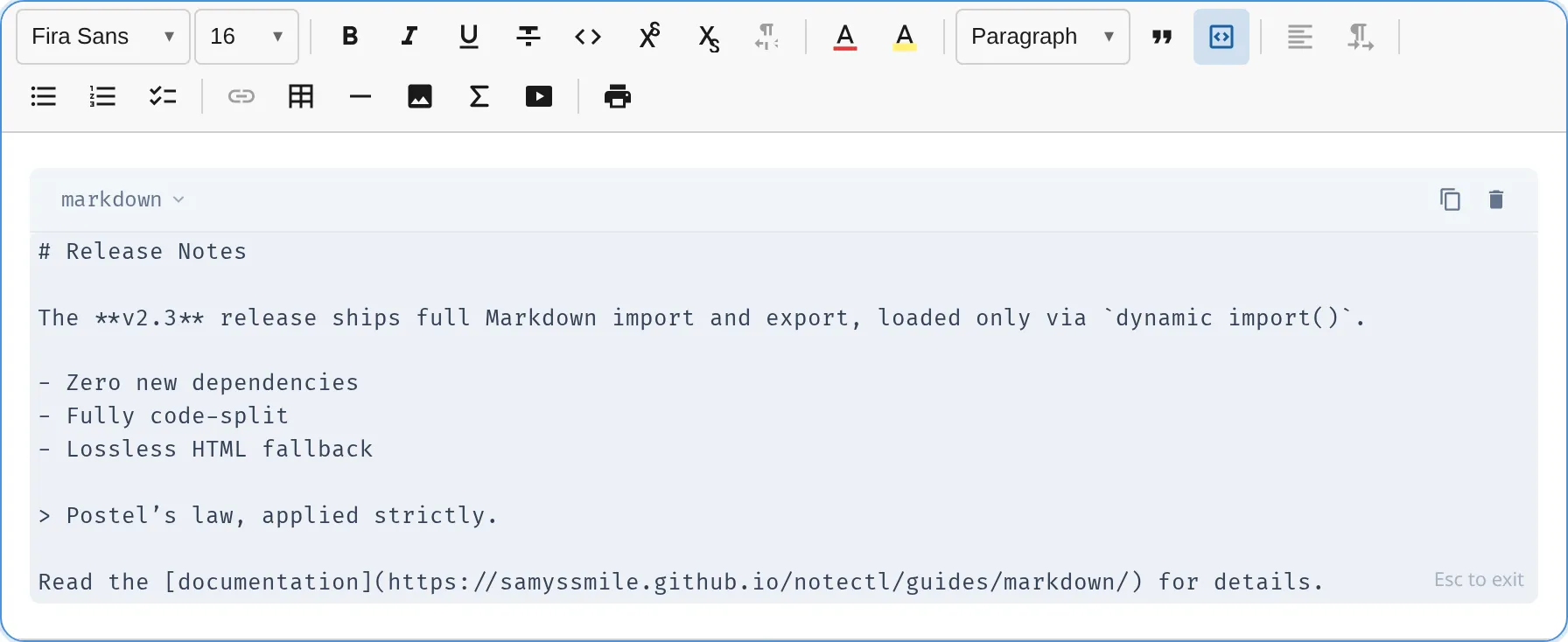
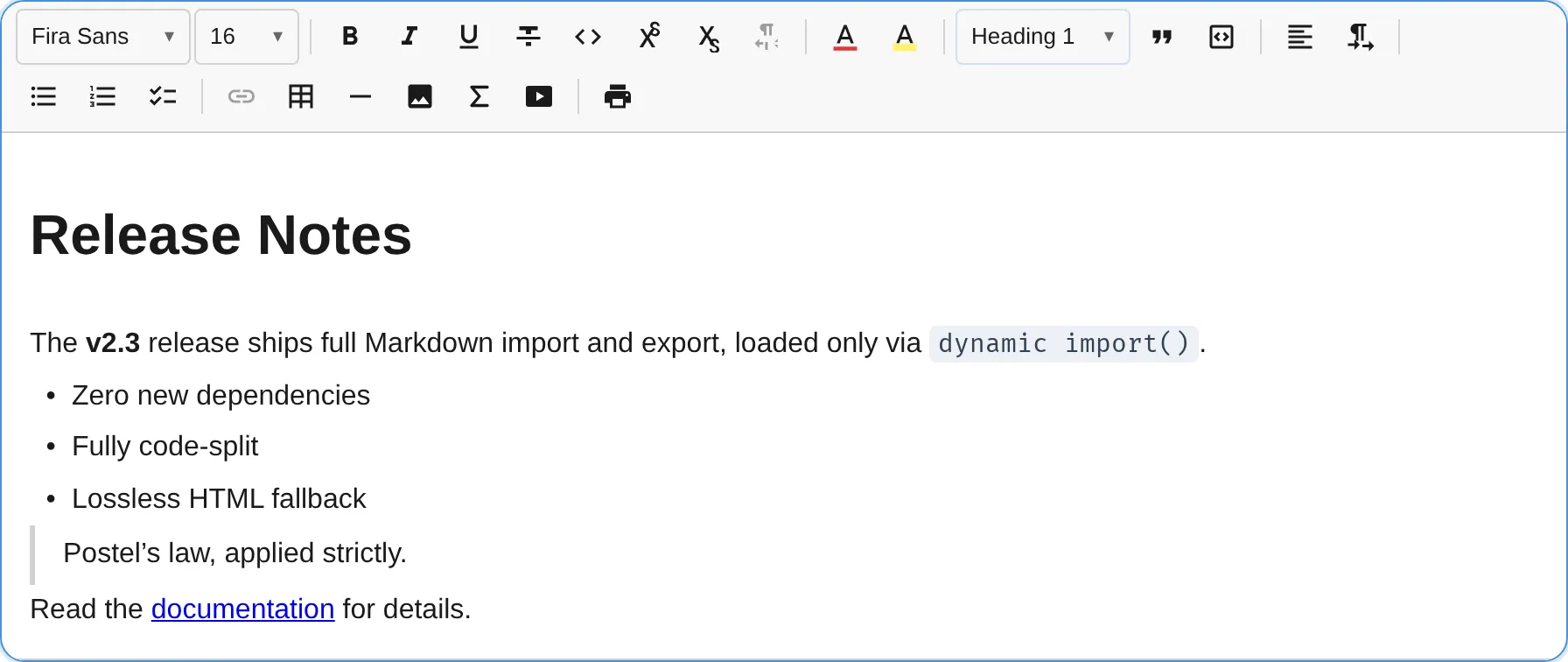
Identity is matched by position, not by content: a block takes the ID of the block at the same place in the current document, and the blocks inside it, such as the paragraphs of a quote or a table cell, repeat the rule. This is intentional: the cursor stays on the same block when content is rewritten in place. Plugins that reference blocks by BlockId should not assume content stability across setContentMarkdown calls.
Clean Markdown carries no internal block identity: notectl generates no data-block-id annotations
in the Markdown output and recognizes none on import. This is separate from semantic
BlockNode.htmlId targets, which are preserved as id attributes in raw HTML when
htmlFallback: true. Compare internal identity to the HTML pair, which carries data-block-id on
every block element for positional matching. Both pairs give the same caret result; the mechanism
differs.
| Pair | Identity carrier |
|---|---|
getJSON / setJSON |
Block IDs in the JSON tree |
getContentHTML / setContentHTML |
data-block-id attribute (unless opted out) |
getContentMarkdown / setContentMarkdown |
Position (IDs matched by path, at every depth) |
getText / setText |
Position order |
Conformance
Section titled “Conformance”Import and export are gated against the official CommonMark 0.31.2 spec (652 examples) plus the GFM extension examples (tables, task lists, strikethrough, autolinks), compared through a normalized structural AST. Every example inside notectl’s supported construct set must pass at 100%, and the small set of documented deviations (below) is pinned in a shrink-only skip list, so coverage can only ratchet up. A second gate asserts that every construct outside the set, raw HTML above all, parses safely and survives a serialize/re-parse round-trip byte-identically, so nothing is ever silently dropped.
Known boundaries
Section titled “Known boundaries”The parser is a linear-time scanner (a ReDoS-safety guarantee for pasted, untrusted input). A few constructs deviate from CommonMark by design:
- Multi-block list items are fully supported (#194): a list item may contain several paragraphs, code blocks, blockquotes, headings, and thematic breaks, following CommonMark’s marker-relative content columns. Nested lists stay flat siblings with an
indentattribute; the one residual deviation is block content that follows a nested list inside the same item — it cannot keep its item-relative order in the flat sibling model and becomes a following block (content is preserved). - Link reference definitions spanning multiple lines are supported for the destination-on-next-line and title-on-next-line forms; multi-line labels and multi-line titles stay paragraph text (kept, never dropped).
- Tabs inside container markers (for example a tab directly after
>) do not expand to 4-column tab stops.
These boundaries affect import only; the serializer always produces output that the parser reads back identically.
Examples
Section titled “Examples”Export for a static site generator
Section titled “Export for a static site generator”// Portable Markdown with no raw HTML — safe for HTML-stripping pipelinesconst md = await editor.getContentMarkdown({ htmlFallback: false });await fs.writeFile('post.md', md);Import from a file
Section titled “Import from a file”const source = await fs.readFile('post.md', 'utf8');await editor.setContentMarkdown(source);Server-side rendering
Section titled “Server-side rendering”import { serializeDocumentToMarkdown } from '@notectl/core/markdown';
// Synchronous — no dynamic import, safe in a Node build stepconst md: string = serializeDocumentToMarkdown(doc, registry);Standalone parse in a build tool
Section titled “Standalone parse in a build tool”import { parseMarkdownToDocument } from '@notectl/core/markdown';
const doc = parseMarkdownToDocument(markdownSource, registry, { extendedInlineSyntax: true, // accept ==highlight==, ^sup^, ~sub~});Disable Markdown paste for a plain-text field
Section titled “Disable Markdown paste for a plain-text field”import { createEditor } from '@notectl/core';
const editor = await createEditor({ markdown: { paste: 'never' }, placeholder: 'Start typing...',});Literal mode: no shorthand transforms at all
Section titled “Literal mode: no shorthand transforms at all”import { createEditor } from '@notectl/core';
// `# Hello` and `**bold**` stay as typed; nothing is auto-converted.const editor = await createEditor({ markdown: false, placeholder: 'Start typing...',});Export with setext headings and asterisk bullets
Section titled “Export with setext headings and asterisk bullets”const md = await editor.getContentMarkdown({ headingStyle: 'setext', bullet: '*', emphasis: '_',});