

Formula Plugin
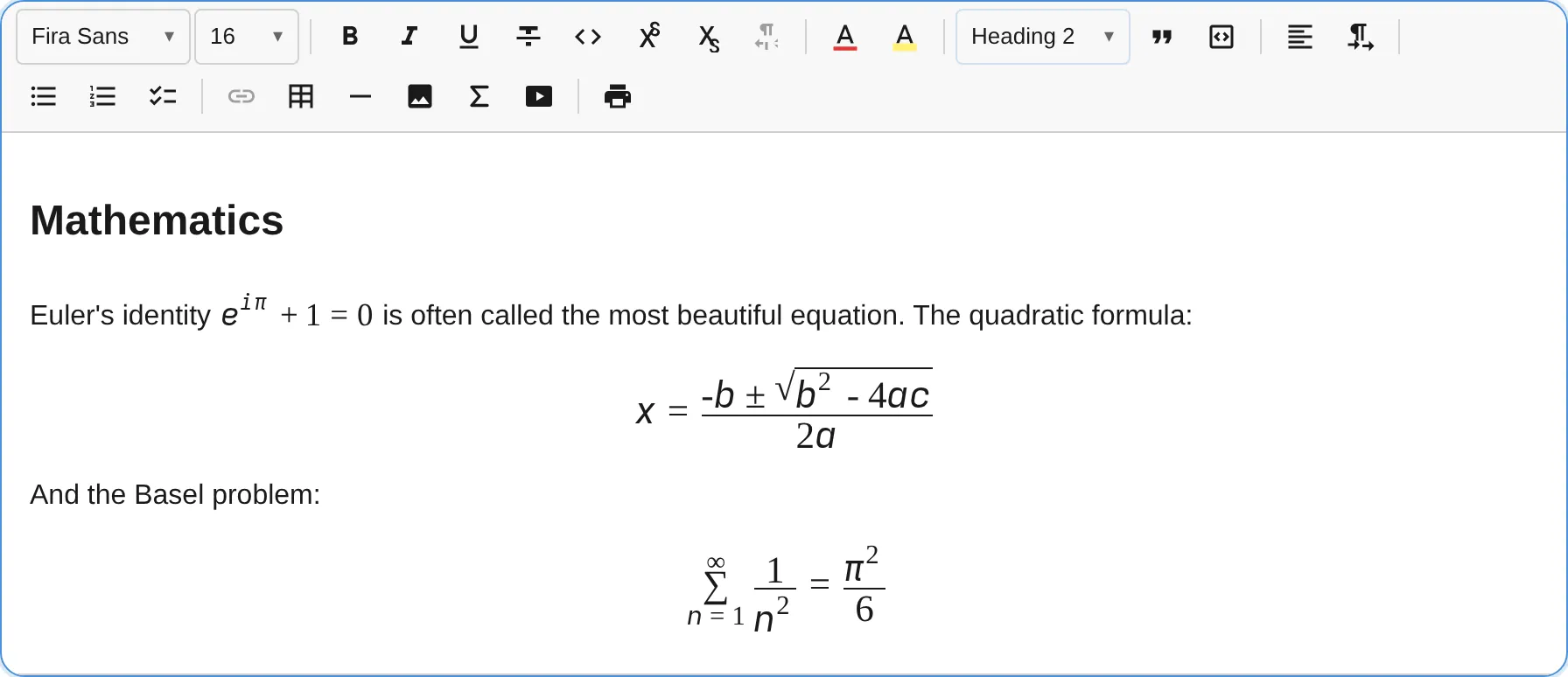
The FormulaPlugin adds inline and block (display) math to notectl. It is built on three principles that set it apart from every KaTeX or MathJax based editor:
- Zero dependencies. Formulas render through the browser’s own native MathML engine. notectl ships no math rendering library, so the single-runtime-dependency promise (
dompurify) stays intact. - Accessibility first. The stored format is MathML, which is exactly what screen readers (NVDA with MathCAT, JAWS, VoiceOver) consume natively. Accessibility is structural, not bolted on.
- Two ways to author, one canonical format. Type LaTeX with a live preview, or build expressions with an accessible structural palette. Both produce the same MathML.
import { FormulaPlugin } from '@notectl/core/plugins/formula';import { NOTECTL_MATH_FONT } from '@notectl/core/fonts/math';
// Recommended: pass the bundled OpenType MATH font for correct rendering in Chromium.new FormulaPlugin({ mathFont: NOTECTL_MATH_FONT });
The plugin is included in the full preset:
import { createFullPreset } from '@notectl/core/presets/full';import { NOTECTL_MATH_FONT } from '@notectl/core/fonts/math';
const preset = createFullPreset({  formula: { mathFont: NOTECTL_MATH_FONT },});
The bundled MATH font
Section titled “The bundled MATH font”Firefox and Safari render MathML with the system OpenType MATH font. Chromium ships none, so without one it draws stretchy constructs incorrectly: matrix brackets stay flat, large integrals, roots, and summations are not enlarged.
notectl solves this with a bundled font, NOTECTL_MATH_FONT, a subset of Noto Sans Math (SIL OFL 1.1). It is exported from the granular ./fonts/math subpath so the independent starter-font payload stays out of native ESM loads, and it is opt-in. Pass it to the plugin and the formula styles apply font-family: 'Notectl Math', math to every formula, which fixes the Chromium rendering. It is a self-hosted font asset, not an npm dependency.
Inserting formulas
Section titled “Inserting formulas”- Toolbar button (group
insert): opens a popup with a LaTeX field, a live preview, an accessible structural palette, and a display toggle. - Input rules: type
$x^2$for inline math and$$\int_0^1 x\,dx$$for a display equation. The closing delimiter triggers the conversion. - Keyboard:
Mod+Shift+Eopens the inline editor at the cursor,Mod+Shift+Mopens the display editor.
Editing existing formulas
Section titled “Editing existing formulas”- Click an inline formula to open its editor.
- Double-click a display formula, or select it and press
Enter. - With the caret next to an inline formula,
Mod+Shift+Eedits it instead of inserting a new one.
Edits commit as a single transaction, so undo and redo work out of the box.
Sizing formulas
Section titled “Sizing formulas”Every formula has a Size control in its editor. Open a formula (click an inline formula, or double-click a display formula) and pick a size next to the LaTeX field. The live preview reflects the choice immediately. This is the most direct way to resize a single formula, and it works the same for inline and display. The size is stored as a node attribute, so it survives undo, redo, and later LaTeX edits.
Formulas also honour the toolbar’s Font Size control. Select a formula (a display formula via the gap cursor, an inline formula via Shift and arrow keys) or a range that includes formulas, such as Select All, then pick a size. MathML inherits the font size, so fractions, roots, and matrices enlarge proportionally. Both paths write the same fontSize node attribute, so they stay consistent. The toolbar integration is generic: any node that declares a fontSize attribute participates, not just formulas.
Authoring methods
Section titled “Authoring methods”LaTeX field
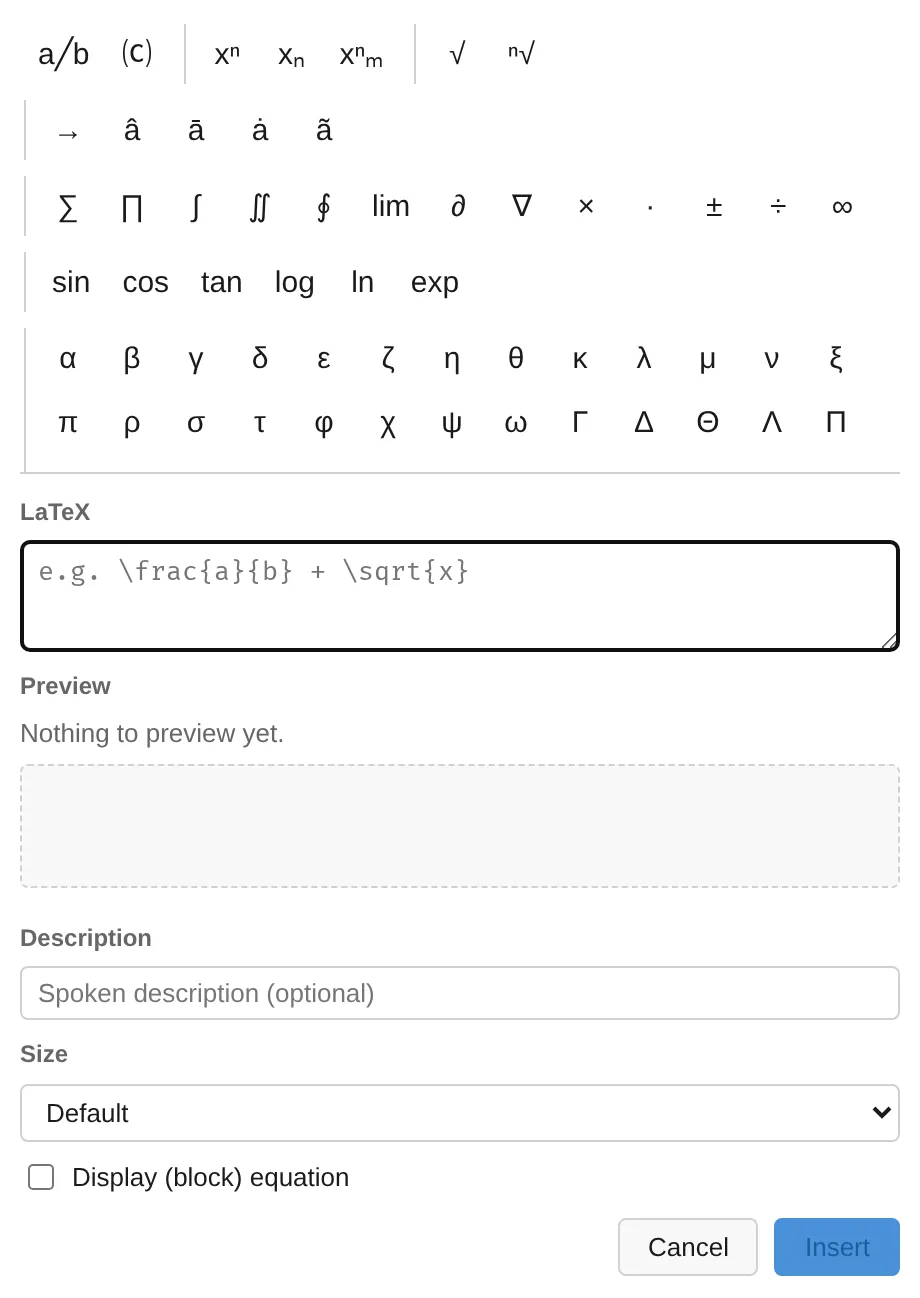
Section titled “LaTeX field”The primary authoring surface is a LaTeX text field with a live MathML preview. It is linear, keyboard friendly, and screen-reader friendly. Unknown commands are surfaced visibly and announced through a live region rather than silently dropped.
Structural palette
Section titled “Structural palette”For non-experts, an accessible palette (an ARIA toolbar with a roving tabindex) inserts common structures at the caret, grouped by purpose: fractions, scripts, roots, accents (vector, hat, bar, dot, tilde), operators (sums, integrals, derivatives), named functions (sin, cos, log, …), the full Greek alphabet, relations, set theory with the number sets (ℝ, ℕ, ℤ, ℚ, ℂ), logic and quantifiers, arrows, auto-sized brackets (including absolute value, norm, floor, and ceiling), ellipses, and matrices. Every button has an accessible label and is reachable by keyboard alone.
Storage and interoperability
Section titled “Storage and interoperability”Each formula stores MathML as the canonical attribute, with the LaTeX source embedded as a TeX annotation for lossless re-editing:
<math display="inline"> <semantics> <mrow>...</mrow> <annotation encoding="application/x-tex">e^{i\pi} + 1 = 0</annotation> </semantics></math>Because MathML is the shared language of serious math producers, paste interop comes almost for free. Pasting from a KaTeX page, a MathJax page, a native-MathML source, or Microsoft Word with “Copy MathML” produces an editable, accessible formula. The paste path reads the raw clipboard HTML, extracts the <math>, sanitizes it, and reads the embedded LaTeX when present.
A pasted or inserted formula replaces a selected range. An inline formula takes the place of the range. A display formula goes on its own line after the block where the range started, and the text around the range stays in that block.
Accessibility
Section titled “Accessibility”- The stored MathML is the screen-reader surface. No extra configuration is needed.
- Each formula carries a readable fallback label via the native
alttextattribute for assistive technology that does not process MathML. - The editor field, palette, and overlay are fully keyboard operable, with ARIA roles and labels, visible focus, and live announcements.
- The insert and edit popup contains keyboard focus: it opens on the LaTeX field, and Tab and Shift+Tab cycle through the palette, LaTeX field, description, size control, display toggle, and action buttons without leaving the popup. Escape closes it.
- Display formulas are selectable by keyboard through the gap cursor; an inline formula selected with Shift and the arrow keys shows the normal selection highlight.
Supported LaTeX
Section titled “Supported LaTeX”The bundled converter covers a curated subset of roughly 200 of the most common commands. Math-alphabet commands such as \mathbb{R} emit the real Unicode glyph (ℝ) rather than relying on mathvariant, which Chromium’s MathML Core no longer honours.
- Structure:
\frac,\dfrac,\tfrac,\binom,\sqrt(with optional index), superscripts, subscripts, primes. - Greek: lowercase, uppercase, and variant letters.
- Operators and relations:
\times,\cdot,\pm,\leq,\geq,\neq,\approx,\equiv,\in,\subseteq, and many more. - Big operators:
\sum,\prod,\int,\oint,\lim,\max,\min, with correct limit placement. - Delimiters:
\left ... \rightwith stretchy fences, including the null delimiter. - Accents:
\hat,\bar,\vec,\tilde,\dot,\overline,\widehat, and more. - Environments:
matrix,pmatrix,bmatrix,Bmatrix,vmatrix,Vmatrix,cases,aligned,array. - Fonts and text:
\mathbb,\mathcal,\mathfrak,\mathbf,\mathit,\mathsf,\mathtt,\mathrm,\text,\operatorname. - Spacing:
\,,\:,\;,\!,\quad,\qquad.
Unknown commands render as a visible, announced error marker so nothing fails silently.
Unknown delimiter specifications after \left or \right also render an error marker at the affected fence, while the formula body and following content remain visible. The converter reports Unknown delimiter with the original specification and its zero-based source position. This also applies to a standalone \right, which retains its unmatched-delimiter diagnostic. The null delimiter . remains invisible.
Only registered commands and environments are recognized; names such as \toString and \constructor are handled as unknown commands. Invalid formulas remain editable and can be imported and exported through Markdown without losing their LaTeX source or interrupting the rest of the document.
Pathologically deep nesting (more than a hundred levels of groups, arguments, or superscripts and subscripts) is cut off at a fixed depth limit. The converter renders a visible error marker in place of the dropped part and reports Maximum nesting depth exceeded, while the LaTeX source is kept unchanged.
Configuration
Section titled “Configuration”interface FormulaPluginConfig { /** Live Markdown shortcuts `$...$` (inline) and `$$...$$` (display) math. Default: true */ readonly inputRule?: boolean; /** Locale override for user-facing strings. */ readonly locale?: FormulaLocale; /** Keyboard shortcut overrides. */ readonly keymap?: { readonly insertInline?: string | null; // default: 'Mod-Shift-E' readonly insertDisplay?: string | null; // default: 'Mod-Shift-M' }; /** Preset px sizes in the editor's size control; pass [] to hide it. */ readonly fontSizes?: readonly number[]; /** Bundled OpenType MATH font (import from '@notectl/core/fonts/math'). */ readonly mathFont?: FontDefinition;}Internationalization
Section titled “Internationalization”Every user-facing string (toolbar label and tooltip, the editor popup, palette group names, and live-region announcements) is translatable. The plugin ships translations for Arabic, German, English, Spanish, French, Hindi, Portuguese, Russian, and Chinese, chosen automatically from the editor’s language. Pass a custom locale to override individual strings.
Architecture note
Section titled “Architecture note”The converter (latex/), the MathML helpers (mathml/), and the accessible field (math-field/) are framework-agnostic with zero notectl imports, so they can be published as a standalone accessible math component and converter library without changes.