

Font Plugin
The FontPlugin provides a font family selector with automatic @font-face CSS injection for custom fonts (WOFF2, TTF, OTF).
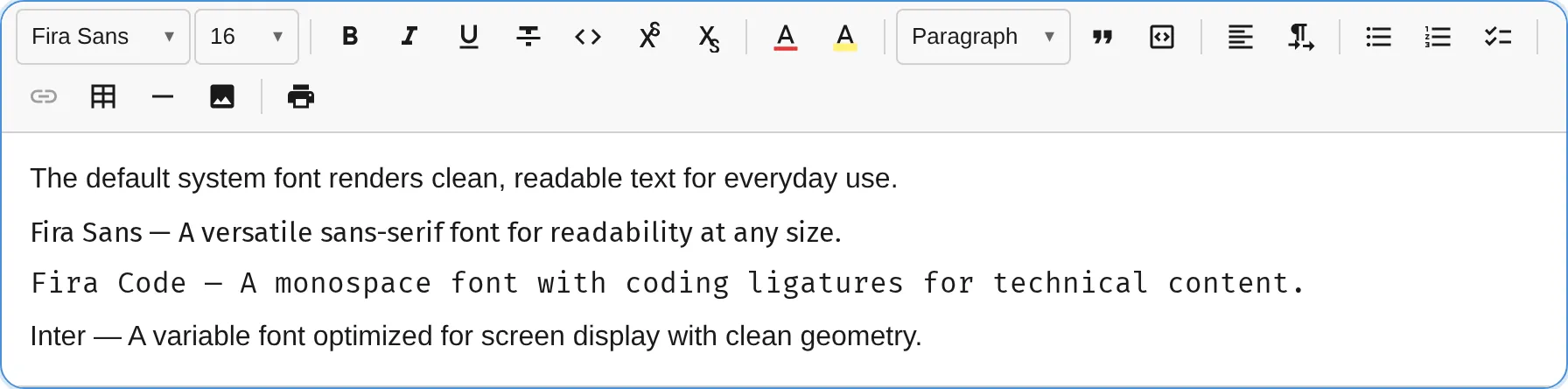
For a complete guide on using custom fonts, see Custom Fonts.
import { FontPlugin } from '@notectl/core/plugins/font';import { STARTER_FONTS } from '@notectl/core/fonts';
new FontPlugin({  fonts: [...STARTER_FONTS],})
Configuration
Section titled “Configuration”interface FontConfig { /** Fonts available in the editor. */ readonly fonts: FontDefinition[]; /** Name of the default font. Selecting it removes the mark. */ readonly defaultFont?: string; /** Custom locale strings. */ readonly locale?: FontLocale;}
interface FontDefinition { /** Display name in toolbar dropdown. */ readonly name: string; /** CSS font-family value. */ readonly family: string; /** Category for grouping in the picker. */ readonly category?: 'serif' | 'sans-serif' | 'monospace' | 'display' | 'handwriting'; /** @font-face descriptors for auto-injection. */ readonly fontFaces?: FontFaceDescriptor[];}
interface FontFaceDescriptor { /** CSS src value (e.g., "url('/fonts/Inter.woff2') format('woff2')"). */ readonly src: string; /** Weight (e.g., '400' or '100 900' for variable fonts). */ readonly weight?: string; /** Style (e.g., 'normal' or 'italic'). */ readonly style?: string; /** Display strategy. Default: 'swap'. */ readonly display?: string;}Starter Fonts
Section titled “Starter Fonts”Built-in fonts with embedded WOFF2 data (no external URLs needed):
import { STARTER_FONTS, FIRA_CODE, FIRA_SANS } from '@notectl/core/fonts';| Constant | Font | Category | Weights |
|---|---|---|---|
FIRA_SANS | Fira Sans | sans-serif | 400 |
FIRA_CODE | Fira Code | monospace | 400 |
STARTER_FONTS | Both of the above | - | - |
Commands
Section titled “Commands”| Command | Description | Returns |
|---|---|---|
setFont | Reserved — font is applied via the toolbar popup | false |
removeFont | Remove font mark from selection (reset to default) | boolean |
Toolbar
Section titled “Toolbar”The font plugin renders as a combobox-style selector. The label updates to show the active font name at the cursor position. Clicking opens a font picker popup where each font name is rendered in its own typeface for instant preview.
Mark Spec
Section titled “Mark Spec”| Mark | Attributes | Renders As |
|---|---|---|
font | family: string | <span style="font-family: ..."> |
Default Font Behavior
Section titled “Default Font Behavior”When the user selects the defaultFont, the font mark is removed rather than applied. This keeps the document clean — text in the default font has no unnecessary marks.
Custom Font Example
Section titled “Custom Font Example”import { FontPlugin } from '@notectl/core/plugins/font';import { STARTER_FONTS } from '@notectl/core/fonts';import type { FontDefinition } from '@notectl/core/plugins/font';
const INTER: FontDefinition = { name: 'Inter', family: "'Inter', sans-serif", category: 'sans-serif', fontFaces: [ { src: "url('/fonts/Inter-Variable.woff2') format('woff2')", weight: '100 900', style: 'normal', }, ],};
new FontPlugin({ fonts: [...STARTER_FONTS, INTER], defaultFont: 'Fira Sans',})Google Fonts Example
Section titled “Google Fonts Example”const ROBOTO: FontDefinition = { name: 'Roboto', family: "'Roboto', sans-serif", category: 'sans-serif', fontFaces: [ { src: "url('https://fonts.gstatic.com/s/roboto/v30/KFOmCnqEu92Fr1Mu4mxK.woff2') format('woff2')", weight: '400', style: 'normal', }, { src: "url('https://fonts.gstatic.com/s/roboto/v30/KFOlCnqEu92Fr1MmWUlfBBc4.woff2') format('woff2')", weight: '700', style: 'normal', }, ],};