One tag. Any framework.
<notectl-editor> is a native custom element. No React bindings, no Vue wrappers, no Angular modules. Import it, drop it in, done. Framework upgrades never break your editor.
Most rich text editors force you into their world. notectl works in yours. Ship a <notectl-editor> Web Component that drops into React, Vue, Angular, Svelte, or plain HTML with zero adapters, zero wrappers, and zero compromises.
One tag. Any framework.
<notectl-editor> is a native custom element. No React bindings, no Vue wrappers, no Angular modules. Import it, drop it in, done. Framework upgrades never break your editor.
Only ship what you use
Every feature is a plugin. Bold, tables, fonts, checklists — compose exactly the editor you need. Your bundle stays lean, your users stay happy.
State you can trust
Immutable state, atomic transactions, invertible steps. Every change is predictable, every change is undoable. No more “how did the DOM get into this state?” debugging.
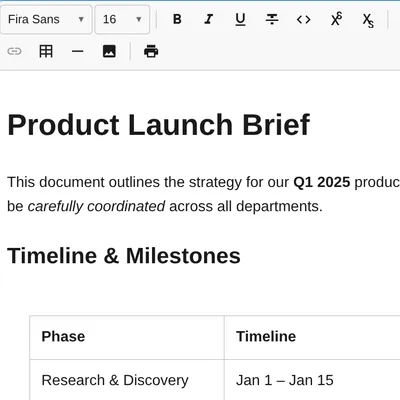
Toolbar in one line
Configure your toolbar with a simple array. Group plugins visually, reorder freely, add separators — all declarative, zero DOM manipulation.
import { createEditor } from '@notectl/core';
const editor = await createEditor({ placeholder: 'Start typing...',});document.getElementById('editor')!.appendChild(editor);import { createEditor, TextFormattingPlugin, HeadingPlugin, ListPlugin, TablePlugin, LinkPlugin, FontPlugin, FontSizePlugin, TextColorPlugin, AlignmentPlugin, BlockquotePlugin, StrikethroughPlugin, HorizontalRulePlugin, STARTER_FONTS,} from '@notectl/core';
const editor = await createEditor({ toolbar: [ [new TextFormattingPlugin()], [new HeadingPlugin()], [new ListPlugin(), new BlockquotePlugin()], [new LinkPlugin(), new TablePlugin()], [new FontPlugin({ fonts: [...STARTER_FONTS] })], [new FontSizePlugin()], [new TextColorPlugin()], [new AlignmentPlugin()], [new StrikethroughPlugin(), new HorizontalRulePlugin()], ],});document.getElementById('editor')!.appendChild(editor);// Get content as JSON, HTML, or plain textconst json = editor.getJSON();const html = editor.getHTML();const text = editor.getText();
// Set content programmaticallyeditor.setHTML('<h1>Hello</h1><p>World</p>');editor.setJSON(savedDocument);
// Listen for changeseditor.on('stateChange', ({ newState }) => { save(newState.doc);});18 built-in plugins
Text formatting, headings, lists, tables, links, code blocks, images, fonts, font sizes, text colors, alignment, blockquotes, strikethrough, superscript/subscript, highlight, horizontal rules, hard breaks, and a declarative toolbar. Every plugin ships with keyboard shortcuts, input rules, and accessible toolbar items.
Markdown-style shortcuts
Type # for headings, - for bullet lists, 1. for numbered lists, > for blockquotes, --- for horizontal rules, [ ] for checklists. Your power users will feel right at home.
Tables that actually work
Full grid picker for insertion, multi-cell selection, row/column operations, keyboard navigation between cells. Not a bolted-on afterthought.
Custom fonts made easy
Pass a FontDefinition with WOFF2/TTF/OTF sources. notectl injects @font-face rules automatically. Bundle starter fonts (Fira Sans, Fira Code) or bring your own.
notectl follows a strict unidirectional data flow. Every user action creates a Transaction with atomic, invertible Steps. Transactions pass through a priority-ordered middleware chain, produce a new immutable EditorState, and the view layer patches only the changed DOM blocks.
Input → Transaction (Steps) → Middleware → New State → DOM ReconciliationThis gives you predictable updates, built-in undo/redo, plugin interception points, and state transitions that are pure functions — easy to test, easy to reason about.
| Layer | What it does |
|---|---|
| Model | Immutable Document, BlockNode, TextNode, InlineNode, Mark, Selection |
| State | EditorState container, Transaction builder, History with step inversion |
| View | Block-level DOM reconciliation, selection sync, input handling |
| Commands | toggleMark, splitBlock, deleteBackward, insertTable, and more |
| Plugins | Self-contained feature modules with schema, commands, keymaps, toolbar items |